Supercharging Frontend Development with the Playground API DevTools Extension
Control mock latency, inject 500 errors, reset sandbox states, and switch RBAC user roles directly inside Chrome & Edge DevTools.
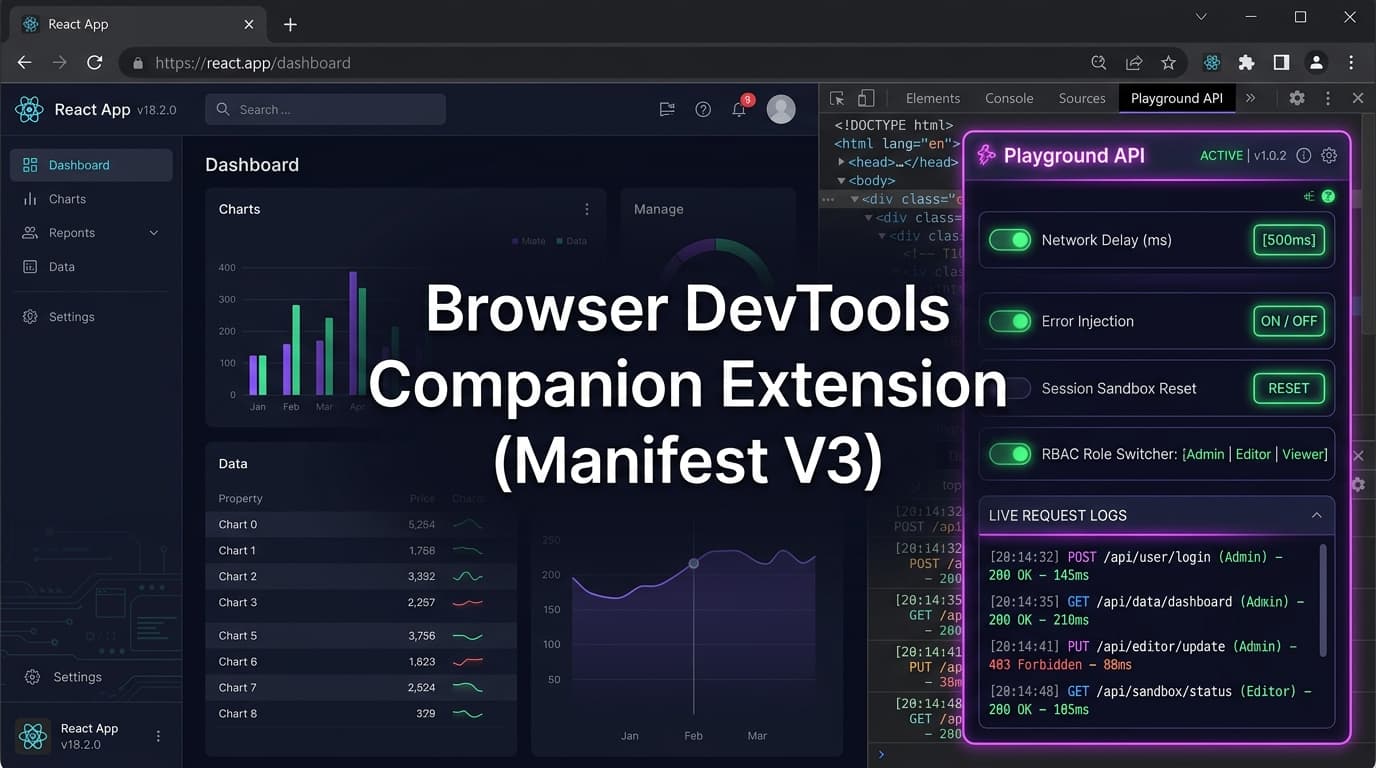
Supercharging Frontend Development with the Playground API DevTools Extension
When building client-side web applications against mock backends, switching context between your code editor, the browser console, and backend config panels slows down your workflow.
Today, we are announcing the Playground API Browser DevTools Extension (Manifest V3 for Chrome, Edge, Brave, and Firefox).
It embeds a dedicated Playground API tab directly into your browser's Developer Tools, giving you instantaneous, zero-code control over your session sandbox.
1. What You Can Do in the DevTools Panel
- ⏱️ Live Latency Slider: Toggle network delays from 0ms to 5,000ms with a slider to test UI spinners in real time without touching code.
- 💥 Chaos & Error Injection: Force random
500 Server Error,429 Rate Limit, or504 Gateway Timeoutresponses on specific routes. - 🔄 One-Click Sandbox Reset: Wipe all overlay mutations (posts, comments, todos) back to initial seed data in 1 click.
- 🎭 RBAC Role Switcher: Switch active session role between
Admin,Editor,Viewer, andGuestto instantly test 403 Forbidden permission gates. - 📋 Live Activity Feed: Monitor outgoing Playground API requests with status codes, headers, and payload bodies.
2. Installing the Extension
Available on the Chrome Web Store:
- Open Chrome Web Store and search for
Playground API Companion. - Click Add to Chrome.
- Open any web app running locally (e.g.
http://localhost:3000) that connects tohttps://playground.nileslabs.com. - Press
F12orCmd + Option + Ito open DevTools, and click the Playground API tab!
3. How It Works Under the Hood
The extension uses Chrome's declarativeNetRequest and devtools.panels APIs to automatically intercept outgoing requests to playground.nileslabs.com and inject simulation headers (X-Simulate-Delay, X-Simulate-Status, X-Playground-Identity, X-Playground-Role) seamlessly.
4. Live Extension Guide
Explore features, screenshots, and developer documentation:
👉 https://playground.nileslabs.com/docs/extension
Conclusion
Debug faster and test edge cases effortlessly with the Playground API DevTools Extension!
Try Playground API in Your Own App
Stateful mock REST & GraphQL API with private sandbox overlays.