How to Test JWT Token Expiration & Axios Silent Refresh Race Conditions in React

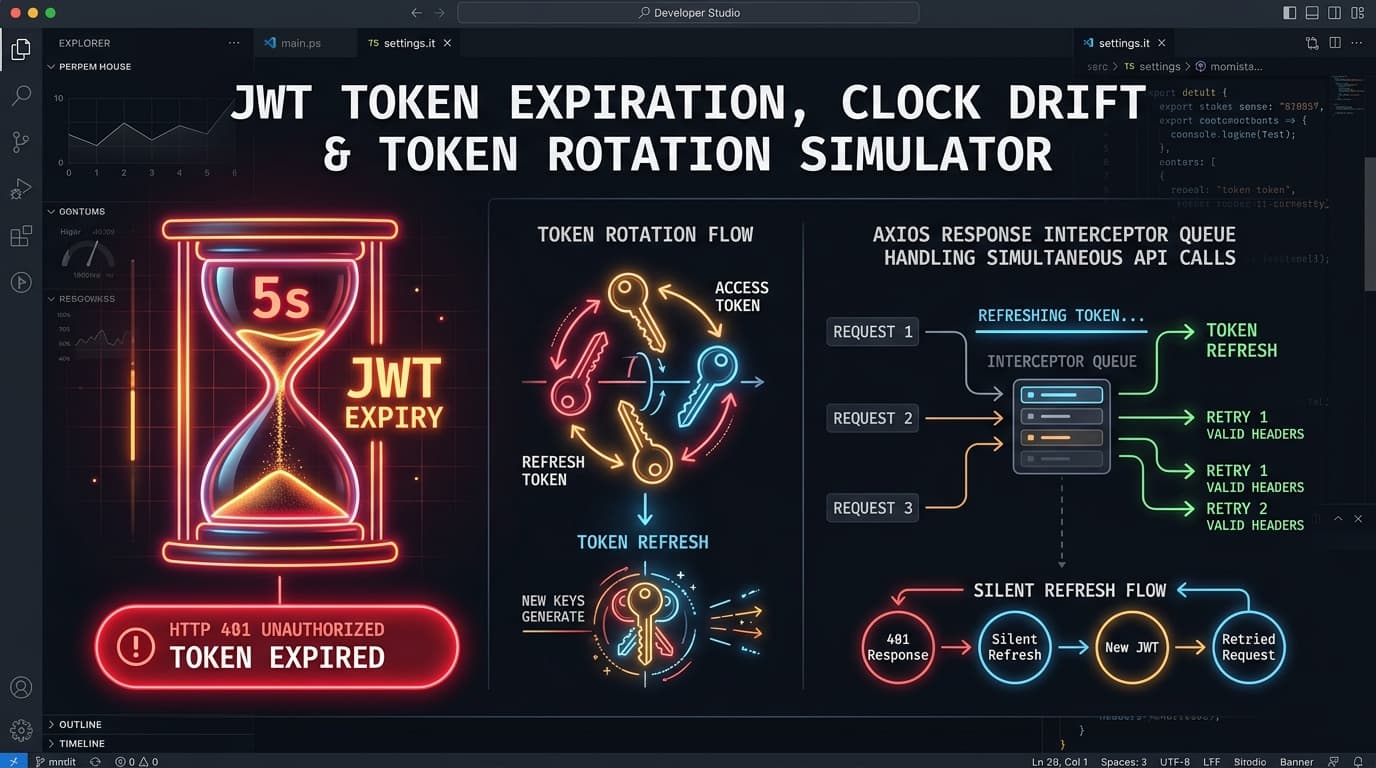
Learn how to test 5s JWT expiration, Axios response interceptor queues, refresh token rotation with reuse detection, and clock drift in Playground API.
NK
Nilesh Kumar
Creator of Playground API
How to Test JWT Token Expiration & Axios Silent Refresh Race Conditions in React

How to Test JWT Token Expiration & Axios Silent Refresh Race Conditions in React

Writing a silent token refresh flow in React or Next.js using Axios interceptors looks simple on paper:

  1. When an API call returns 401 Unauthorized, catch the error.
  2. Call POST /auth/refresh with your refresh token to get a fresh access token.
  3. Retry the original failed request with the new Authorization: Bearer <token> header.

However, in real-world applications, race conditions break this:

  • If a dashboard loads 6 API requests in parallel when the access token expires, all 6 requests fail with 401 simultaneously.
  • If your interceptor fires 6 concurrent POST /auth/refresh requests with single-use refresh token rotation, the backend detects token reuse and invalidates the entire user session, logging the user out!

Playground API now provides an ultra-fast 5-Second JWT Expiration & Token Rotation Simulator!


1. Simulating 5-Second JWT Expiry

Request a short-lived token:

Terminal
1
curl -X POST https://playground.nileslabs.com/auth/login \
2
-H "Content-Type: application/json" \
3
-H "X-Simulate-JWT-Expiry: 5s" \
4
-d {
5
"email": "developer@nileslabs.com",
6
"password": "password123"
7
}

Response:

json
1
{
2
"access_token": "eyJhbGciOiJIUzI1NiIsIn...",
3
"refresh_token": "rft_98a7b6c5d4e3f2",
4
"expires_in": 5,
5
"token_type": "Bearer"
6
}

Wait 5 seconds, and any subsequent request returns 401 Unauthorized ("TokenExpiredError").


2. Implementing a Queue-Based Axios Interceptor

typescript
1
import axios from 'axios';
2
3
const api = axios.create({ baseURL: 'https://playground.nileslabs.com' });
4
5
let isRefreshing = false;
6
let failedQueue: Array<{ resolve: (token: string) => void; reject: (err: any) => void }> = [];
7
8
const processQueue = (error: any, token: string | null = null) => {
9
failedQueue.forEach((prom) => {
10
if (error) prom.reject(error);
11
else prom.resolve(token!);
12
});
13
failedQueue = [];
14
};
15
16
api.interceptors.response.use(
17
(response) => response,
18
async (error) => {
19
const originalRequest = error.config;
20
21
if (error.response?.status === 401 && !originalRequest._retry) {
22
if (isRefreshing) {
23
return new Promise((resolve, reject) => {
24
failedQueue.push({ resolve, reject });
25
}).then((token) => {
26
originalRequest.headers['Authorization'] = Bearer ${token};
27
return api(originalRequest);
28
});
29
}
30
31
originalRequest._retry = true;
32
isRefreshing = true;
33
34
try {
35
const { data } = await axios.post('https://playground.nileslabs.com/auth/refresh', {
36
refreshToken: localStorage.getItem('refreshToken'),
37
});
38
39
localStorage.setItem('accessToken', data.access_token);
40
localStorage.setItem('refreshToken', data.refresh_token);
41
42
api.defaults.headers.common['Authorization'] = Bearer ${data.access_token};
43
processQueue(null, data.access_token);
44
45
originalRequest.headers['Authorization'] = Bearer ${data.access_token};
46
return api(originalRequest);
47
} catch (err) {
48
processQueue(err, null);
49
return Promise.reject(err);
50
} finally {
51
isRefreshing = false;
52
}
53
}
54
return Promise.reject(error);
55
}
56
);

3. Interactive JWT Simulator Studio

Test concurrent requests, token rotation, and clock drift in the documentation:

👉 https://playground.nileslabs.com/docs/jwt-rotation


Conclusion

Test your authentication recovery logic without waiting hours for tokens to expire. Master silent token refresh with Playground API!

Tags:#react#javascript#security#typescript

Try Playground API in Your Own App

Stateful mock REST & GraphQL API with private sandbox overlays.