How to Test RBAC Permissions & 403 Forbidden States in React Without Modifying Backend Auth
Learn how to test Role-Based Access Control (Admin, Editor, Viewer, Guest) and 403 Forbidden permission gates in React using Playground API.
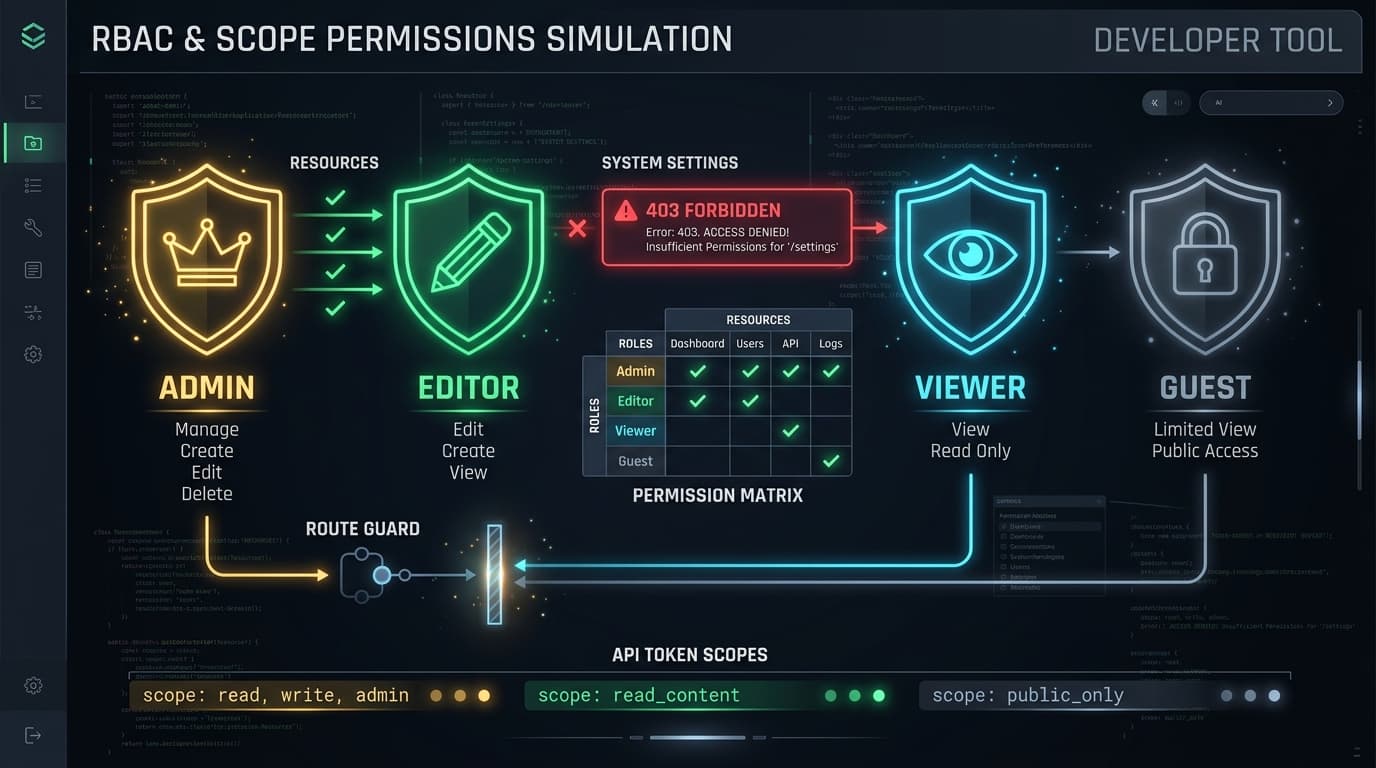
How to Test RBAC Permissions & 403 Forbidden States in React Without Modifying Backend Auth
Implementing Role-Based Access Control (RBAC) in frontend applications is essential:
- Admins can create, edit, and delete any resource.
- Editors can create and edit content, but cannot delete or access billing settings.
- Viewers have read-only access.
- Guests are redirected to login screens.
During frontend development, switching between user roles traditionally requires logging out, clearing cookies, and logging into separate test accounts.
Playground API now provides instantaneous Role-Based Access Control (RBAC) Simulation!
1. Simulating Roles via Headers or Query Parameters
You can switch roles per-request without creating new accounts:
- Header:
X-Playground-Role: admin | editor | viewer | guest - Query Parameter:
?_role=viewer
Response:
2. Building a Permission Gate Component in React
3. Interactive RBAC Studio
Test all role combinations and explore permission matrices in the documentation:
👉 https://playground.nileslabs.com/docs/rbac
Conclusion
Test role gates, permission denials, and UI authorization banners seamlessly with Playground API!
Try Playground API in Your Own App
Stateful mock REST & GraphQL API with private sandbox overlays.